Where to print art prints: a guide to printing digital wall art
A downloaded artwork is only a file until it is on paper. How to choose between a home inkjet, a photo counter, an online lab and a print shop, and which paper and settings to use.
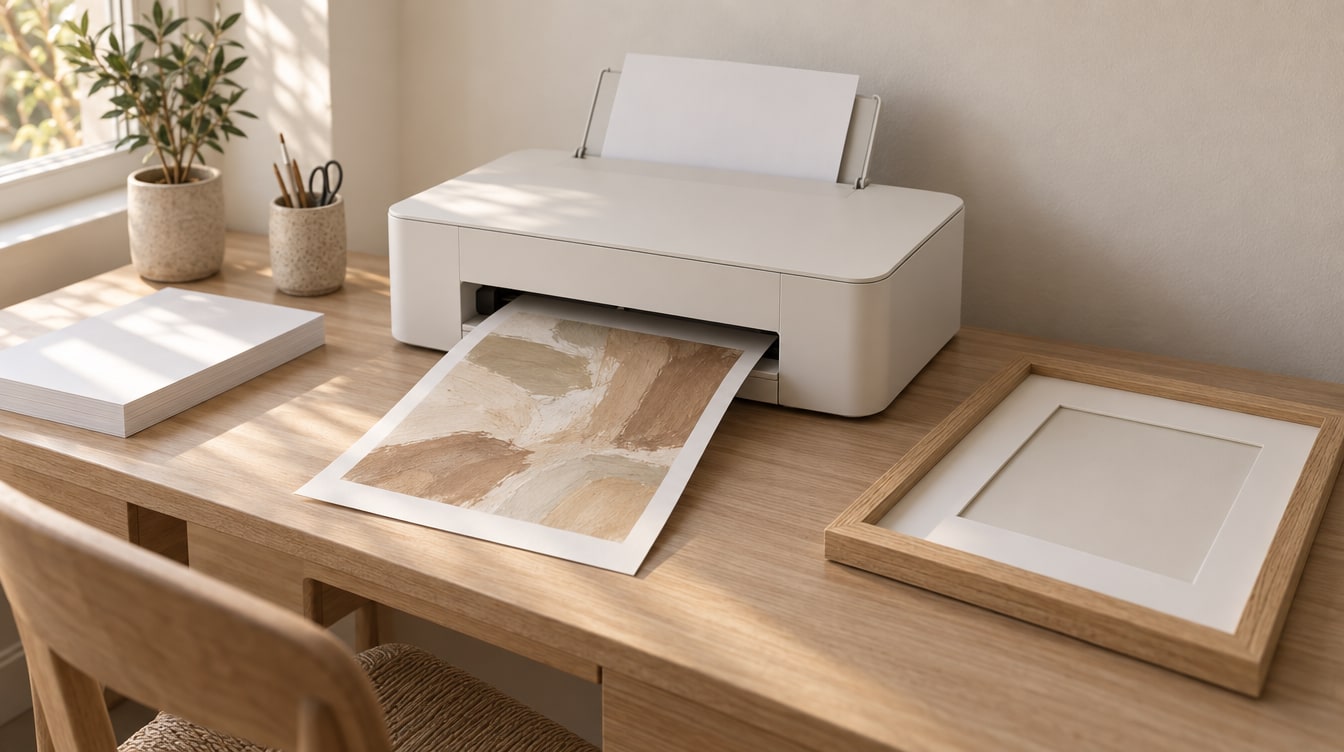
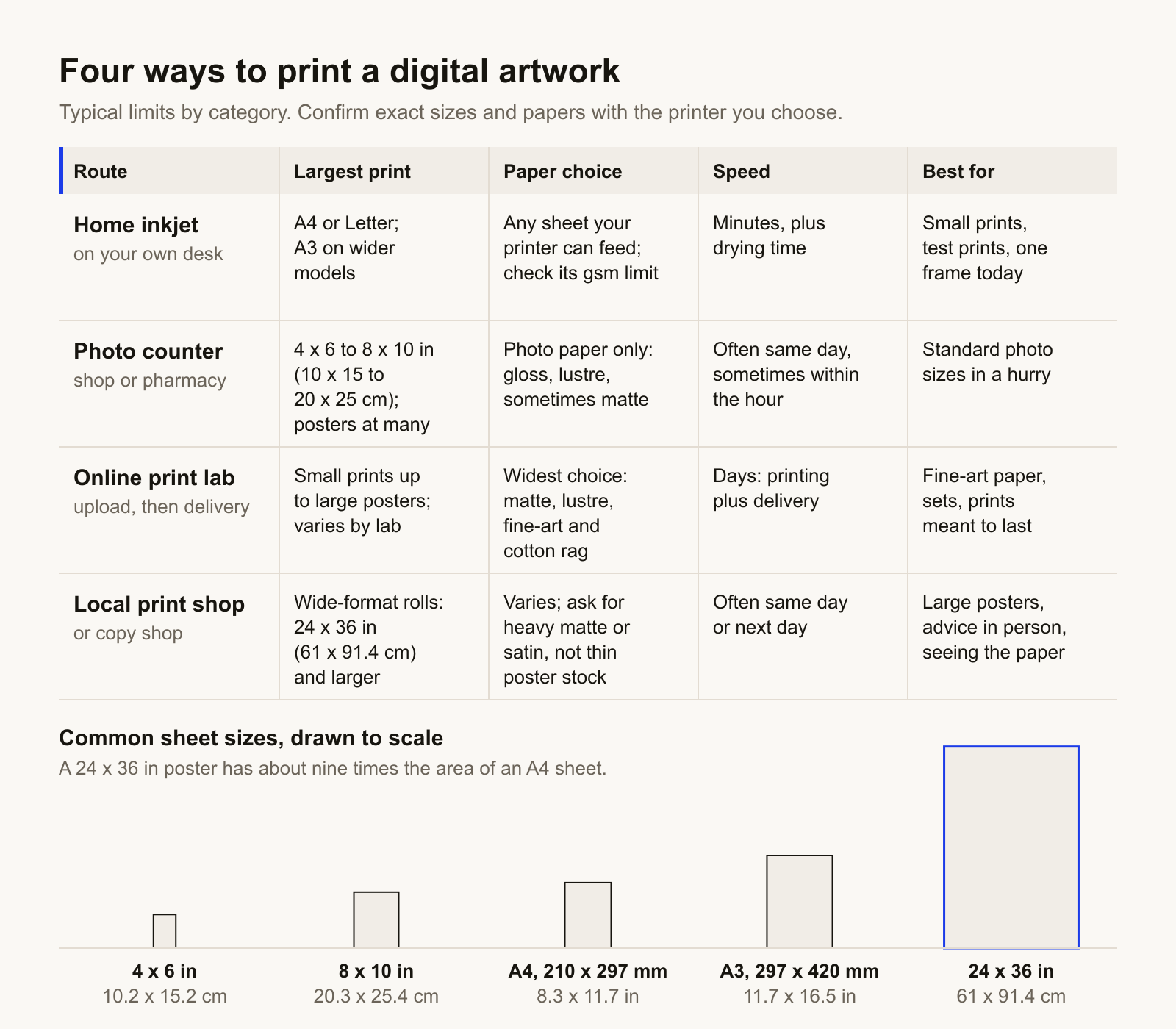
Printable wall art is finished when it is on paper. Until then it is a file, and the question of where to print art prints has four honest answers: a home inkjet, a photo counter, an online print lab, or a local print shop.
Where to print art prints: four routes compared
A home inkjet
Most home inkjets take paper up to A4 (210 x 297 mm, 8.3 x 11.7 in) or US Letter (8.5 x 11 in, 21.6 x 27.9 cm); wider models take A3 (297 x 420 mm, 11.7 x 16.5 in). It is the fastest route, and the only one where you choose the exact sheet.
A photo counter
Photo counters in pharmacies and larger shops print standard photo sizes, from 4 x 6 in (10.2 x 15.2 cm) to 8 x 10 in (20.3 x 25.4 cm), often the same day, and many take poster orders. The paper is usually gloss or lustre photo paper. The ordering screen may crop the image to fill the sheet or auto-correct its colour, so check the crop preview and switch off auto-enhance.
An online print lab
An online lab has the widest paper range of the four. Many offer fine-art matte and cotton rag papers printed with pigment inks, often sold as giclée. The trade-offs are a wait of some days, and that you cannot handle the paper first, though some labs sell sample packs.
A local print or copy shop
This is the usual answer to where to print large posters. Print and copy shops run wide-format printers fed from rolls, so a 24 x 36 in (61 x 91.4 cm) poster is routine work, often ready the same or the next day. You can see the paper first. The default poster stock can be thin, so ask for a heavier matte or satin, and state the finished size you want.
Choose the file that matches the frame
Every print size has a shape: its ratio of width to height. Send a file with the same ratio as the size you order and nothing is cropped, stretched or padded with white bands. So start from the frame: read its size, find its ratio below, pick the file.
- 2:3 — 4 x 6 in (10.2 x 15.2 cm), 12 x 18 in (30.5 x 45.7 cm), 24 x 36 in (61 x 91.4 cm)
- 3:4 — 12 x 16 in (30.5 x 40.6 cm), 18 x 24 in (45.7 x 61 cm)
- 4:5 — 8 x 10 in (20.3 x 25.4 cm), 16 x 20 in (40.6 x 50.8 cm), 24 x 30 in (61 x 76.2 cm)
- 5:7 — 5 x 7 in (12.7 x 17.8 cm)
- 11:14 — 11 x 14 in (27.9 x 35.6 cm)
- 1:1.414 — the ISO A-series: A4, A3, A2 and the rest
wallnine prints are cut to the common frame ratios, so the job is choosing the matching file rather than cropping one yourself; the files a print ships with are listed on its own page. A set there is 3, 6 or 9 artworks, best sent to one printer, in one size, on one paper, so the prints match.
PDF or JPG
JPG is the format all four routes accept, and some photo counters and online labs take nothing else. If you have a PDF, export its page as a JPG at the highest quality setting, or choose a printer that accepts PDF. A PDF carries its own page size, so printed at actual size it comes out at exactly the dimensions it was made for, which may be larger than the print you want. Send the original file, never a screenshot or a copy passed through a messaging app, which will usually compress it.
Print settings that decide the size
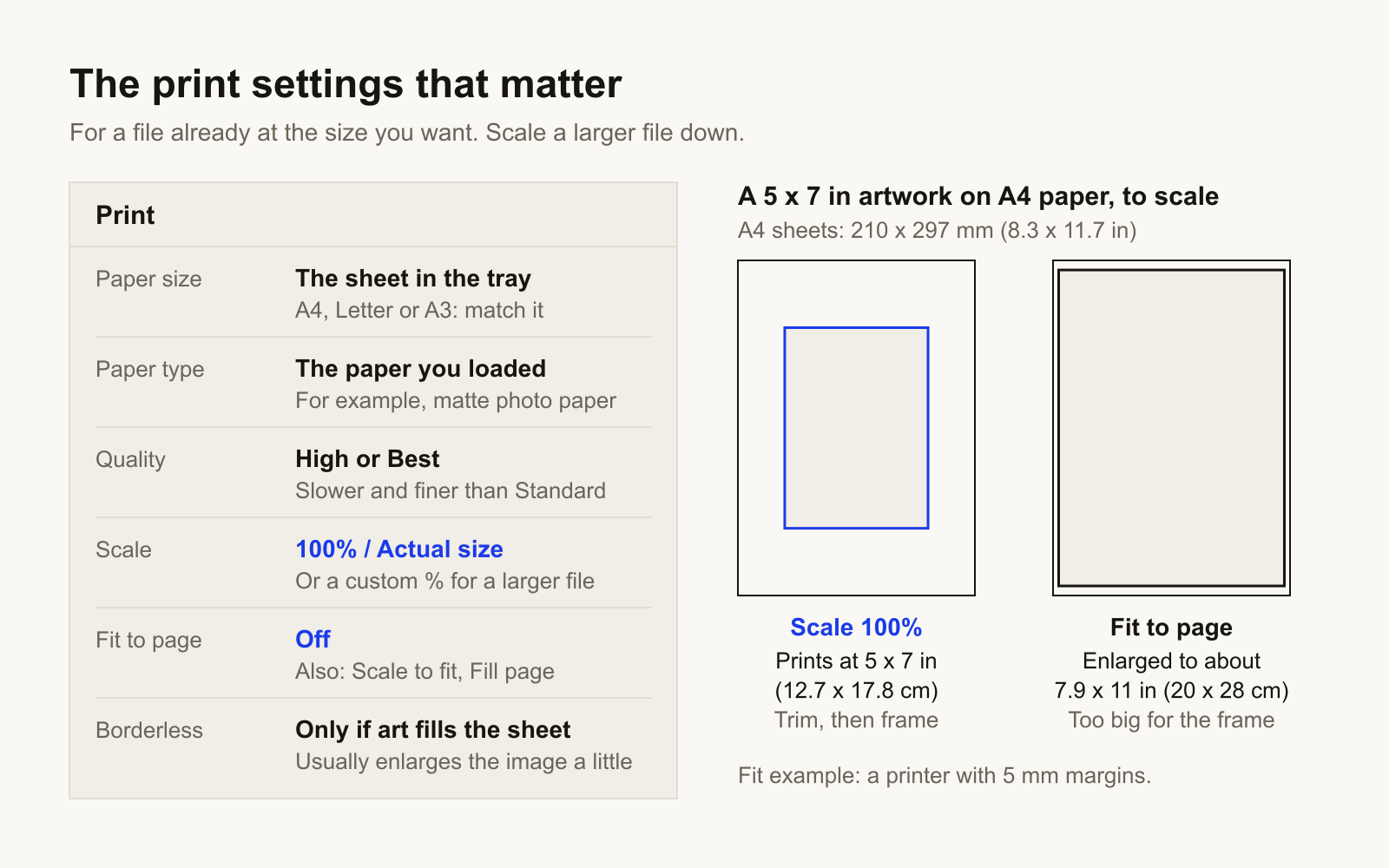
One setting decides whether the print fits the frame: scale. First check the size the file was made at, shown in the print preview. If that is the size you want, print at 100%, or actual size. Fit to page, also labelled scale to fit or fill page, resizes the artwork to suit the sheet rather than the frame: a 5 x 7 in (12.7 x 17.8 cm) artwork sent to A4 paper with it on is enlarged to about 7.9 x 11 in (20 x 28 cm) on a printer with 5 mm margins.
A file sold by ratio is often made at the largest size in that ratio. To print it smaller, enter a custom scale: the width you want divided by the width of the file. A 6 x 8 in (15.2 x 20.3 cm) print from a 12 x 16 in (30.5 x 40.6 cm) file is 50%; at 100%, only part of the artwork would land on the sheet. Printing smaller loses no detail; enlarging a small file adds pixels, not detail. A lab or counter scales a file of the right ratio to the size you order. Measure the first home print with a ruler before framing.
- Set the paper size to the sheet that is in the tray.
- Set scale to 100%, or actual size, when the file is already the size you want; enter a custom percentage when the file is larger. Leave fit to page off either way.
- Set the paper type to match the paper, such as matte photo paper.
- Set quality to high or best.
- Use borderless only when the artwork fills the whole sheet, such as an A4 file on A4 paper; it usually enlarges the image slightly past the edge. Otherwise print on a larger sheet and trim.
- Leave the print flat to dry before framing. Overnight is a safe habit.
Colour: why paper looks quieter than a screen
A screen emits light and paper reflects it, so a print always looks a little darker and softer than the same file on a bright monitor. Turn your screen brightness down before judging.
Most image files made for printing are in sRGB, the colour space that screens, photo counters and most online labs expect. Leave the file as it is; do not convert it to CMYK unless the printer asks. Then order one small test print before a large one: the same file, on the same paper, in a small size of the same ratio.
The best paper for art prints
- Matte — no sheen and no reflections. Suits line work, typography, flat colour and soft abstracts. The usual choice for framed art.
- Lustre or satin, also sold as semi-gloss or pearl — a slight sheen, deeper blacks and stronger colour. Suits photographs.
- Gloss — the most contrast and saturation, and the most glare. Best kept for unframed photographs.
Behind glass, a glossy print adds a second reflective surface, and pressed directly against the glass it can stick over time, one more reason to use a mat.
Weight is given in gsm, grams per square metre. Office copy paper is around 80 gsm; art prints sit roughly between 180 and 300 gsm. Lighter sheets can ripple under heavy ink, and many home printers cannot feed the heaviest, so check the maximum paper weight in the manual. Cotton rag and other fine-art papers are made from cotton fibre rather than wood pulp, are usually matte and acid-free, and suit prints meant to last. Keep any print out of direct sun.
Check the licence before printing for sale
A personal-use download is for your own walls, or for a gift. Selling prints, or printing for a client or a business, needs a licence that says so.
Questions people ask
Where is the best place to print digital art?
It depends on size and paper. Up to A4 or Letter, a home inkjet. For standard photo sizes in a hurry, a photo counter. For fine-art paper, an online print lab. For large posters, a local print or copy shop.
Where can I print a 24x36 poster?
At a local print or copy shop with a wide-format printer, or through an online print lab. A 24 x 36 in (61 x 91.4 cm) poster is beyond a home printer. Send a 2:3 file and ask for a heavier matte or satin paper.
Is matte or glossy paper better for framed prints?
Matte, in most cases: behind glass a glossy print adds a second reflective surface. Choose lustre or satin for photographs where deep blacks matter.